Approve payments
Approve payments (/payables/approvals) is the gate into payables: a new bill — created via form, CSV or API — does not enter the official list until someone approves it.
It is the guard against an improper entry — nothing a person (or the API) creates as a new obligation turns into money going out without a second pair of eyes. It ships on by default and can be turned off per workspace (see Turn it on or off).
Where it lives
Financial menu → Approve payments, right below Payables.
The item carries a badge with the number of bills that still need approval — the waiting and the partially approved ones, not those already approved or rejected. The number respects the company selected in the header.
Turn it on or off
Approval is a workspace setting, and it ships on by default. The control sits on the Approval Settings screen, opened by the gear icon in the top-right corner of this screen — the "Require approval" switch, with the explanation of the two states right below it.
| State | What happens when a bill is created |
|---|---|
| On (default) | It enters the queue and only becomes official after someone approves it — everything this page describes applies. |
| Off | It goes straight to the official payables list, skipping this screen. |
The switch governs new bills only. Turning it off doesn't release what's already waiting, and turning it on doesn't pull already-official bills into the queue; rejected bills stay blocked.
Changes go through Kobana
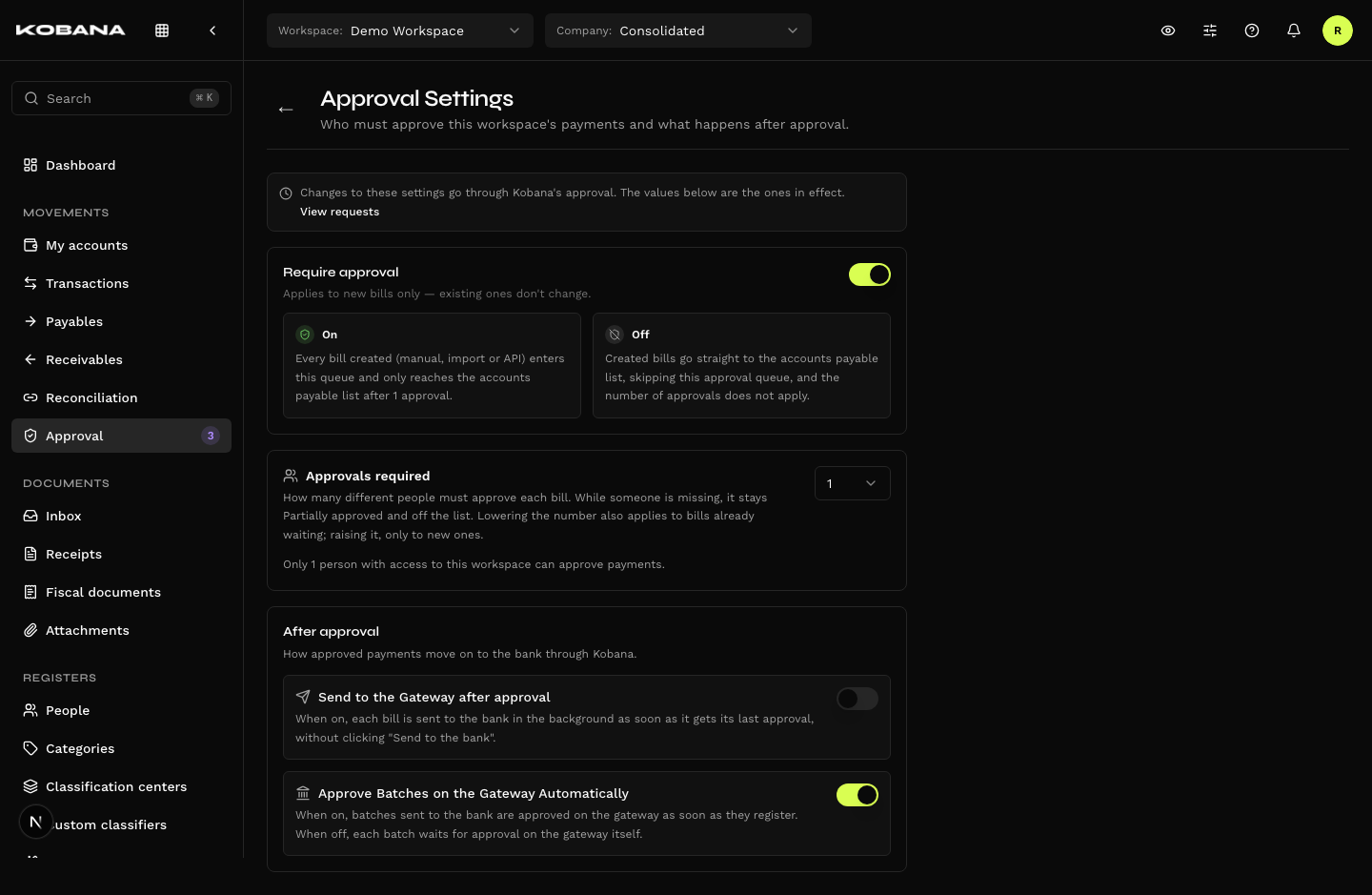
Nothing on that screen changes right away. Turning approval on or off, changing the number of approvals, letting the creator approve, sending to the bank after approval and auto-approving batches on the gateway — all of it becomes a request that Kobana approves or denies, just like the Security rules.
- When you confirm the change, the button is Send for approval, and the notice says: "The change takes effect once Kobana approves it."
- The screen always shows the values in effect. While a request is under review, it shows "There is 1 pending request to change these settings", with the View requests link, which opens the Requests list — where you can follow or cancel the request.
- Requesting these changes takes the Approval settings permission, which by default only the Owner has.
How many approvals
On the same screen, Approvals required sets how many different people must approve each bill — from 1 (default) to 10.
The number can't exceed how many people with access to the workspace and permission to approve payments there are: the screen shows that count and blocks the values above it. If someone loses the permission later, the screen warns in red that new bills will be stuck in the queue.
With more than one, each approval is recorded and the bill stays Partially approved until the last one: it remains off the official list and shows up in the tab of the same name, with its progress ("1 of 2 approvals"). When the last person approves, it enters the list.
If someone edits the payment of a bill still awaiting approval — amount, dates, supplier, barcode, Pix or bank details —, the approvals already given are discarded and it goes back to Waiting: everyone approves again what changed. Editing the category, classification center or notes leaves the approvals alone.
The number is frozen when the bill enters the queue: raising the setting applies to new bills only. Lowering it also applies to the ones already waiting — it is the way out when someone loses the permission and the queue asks for more people than are left. Once Kobana approves the reduction, a bill that already has the approvals of the new number enters the list right away.
What the gate blocks
While it waits for approval, the bill exists but sits outside everything:
- Does not appear in the Payables list
- Does not count toward totals, overdue amounts, cash flow, reports, or the Dashboard
- Cannot be sent to the bank
- Takes no manual settlement — "Mark as paid" does not appear
In other words: as far as the rest of the system is concerned, it is not an obligation yet.
What goes through the gate
| Origin | Goes through? |
|---|---|
Form (/payables/new) | Yes |
| CSV import | Yes |
| API | Yes |
| Publishing a draft | Yes — saving as a draft is not a shortcut around it |
| Recurrence installments generated automatically | Only while the series still awaits approval |
| Bills imported from Fintera | No |
| Bills that predate the gate | No |
The rule in one sentence: anything someone creates as a new obligation goes through; anything derived, synced, or legacy is born official.
The screen
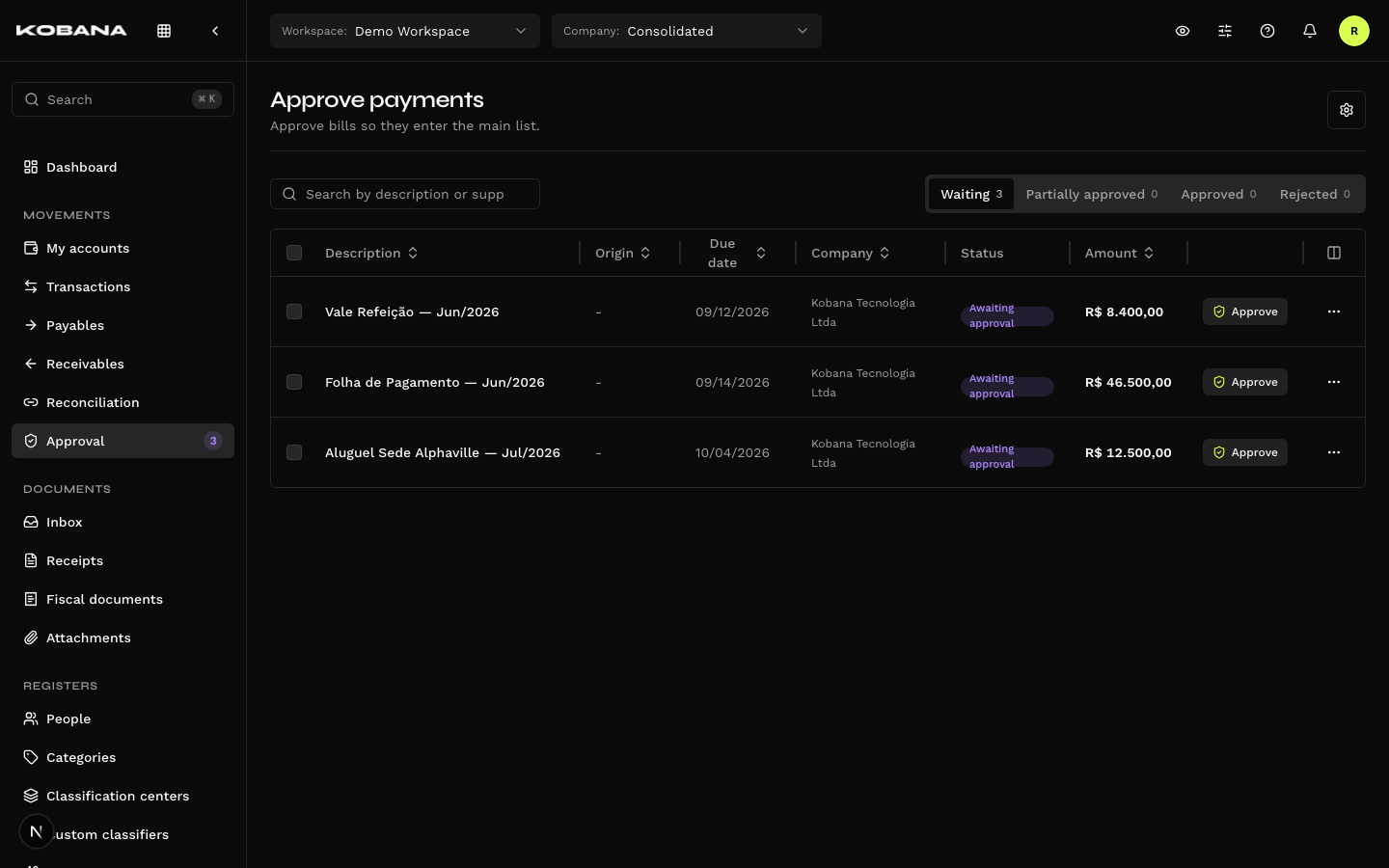
Four tabs, each with its own counter:
| Tab | Lists |
|---|---|
| Waiting | The queue that needs your ok, ordered by due date |
| Partially approved | Bills that already got approvals but still wait on other people |
| Approved | History, most recent first |
| Rejected | History, most recent first, with the reason |
Columns: Description (with the supplier below it, and the rejection reason on the Rejected tab), Origin, Due date, Status, and Amount. With all companies selected, a Company column joins them.
The search covers description and supplier name.
Origin
Tells you where the bill came from, and it is the field the decision rests on:
- Manual — created in the form or through the API
- CSV import — came from a file
Approving
On the Waiting and Partially approved tabs, by three paths:
- The Approve button on the row itself
- The row's action menu
- In bulk — tick the rows and use Approve selected (up to 25 at a time)
The Approve payment? dialog confirms: "1 payment will be approved and enters the accounts payable list." When approvals are still missing, it tells you yours will be recorded and that the bill only enters the list once all of them are given.
After you approve a bill that still waits on other people, its row shows "You approved" instead of the button.
Approving does not send anything to the bank. The bill becomes official and enters the list — sending is a separate step, done in Payables. See Bank dispatch.
In a bulk approval, one isolated failure does not take the others down.
Rejecting
Through the row's action menu — there is no inline rejection and no bulk rejection. A partially approved bill can be rejected too: one person rejecting is enough.
The Reject payment? dialog warns you: "The bill is blocked forever and never enters the accounts payable list. Record the reason (optional)."
The reason is optional (up to 500 characters), but it is what the Rejected tab will show later — without it, the history does not explain the decision.
Rejecting cannot be undone through the interface. A rejected bill cannot be approved afterwards and cannot go to the bank. It stays on the Rejected tab as a record, and nothing more.
The Approved and Rejected tabs have no actions — they are an audit trail. Clicking the description opens the bill.
Who can approve
Anyone with access to the workspace and permission to approve, with two locks:
- Whoever created the bill cannot approve it.
- Each person counts once. When the workspace requires more than one approval, they must come from different people.
Approving is also not exposed in the API — it is a screen-only action.
Night and per-channel approval
The workspace's Security can restrict when and through where approvals happen:
- Night period — with Allow approvals at night off, the screen shows "Approvals are blocked during the night period. They are allowed again at 06:00." (with your workspace's hour) and disables the approve buttons, on the row and in bulk.
- Channel — with Approve off for the channel in use, it shows "This workspace's Security settings don't allow approving payments through this channel."
Rejecting is never blocked — not at night, not by channel. The night rule applies only to approvals made by people: recurrences, ERP imports and the gateway batch approval are not approvals of this gate.
Sending blocked by Security
When a bill, as it stands, won't be able to go to the bank — operation type off, account blocked, payee not allowed, amount above the per-transaction limit —, the row shows the "Sending blocked by Security" badge: "As it is, this bill won't be sent to the bank. Ask for it to be allowed in Security." Approving is still possible; the badge only warns that dispatch will be held back.
Editing an approved bill
An approval covers the payment as it was seen. With approval on, if someone changes any of these fields on a bill that is approved and not yet sent to the bank, it goes back to the queue (Waiting), with its approvals reset, and leaves the Payables list until it is approved again:
- amount;
- supplier;
- payee — name, CPF/CNPJ, Pix key, key type and bank details;
- barcode or typeable line;
- source account ("Pay from");
- operation type and payment method;
- tax data.
This also applies to edits made through the API. Dates, interest, discounts, category, classification center and notes don't send the bill back to the queue.
Once the bill is sent to the bank, those fields are locked — see Editing after dispatch.
How the state shows up in Payables
In the Payables listing, an approved bill shows a round badge with a shield; hover it to read "Creation approved", followed by who approved it and when — that is where the audit trail is at hand, without opening the bill. The other states do not appear there — by the gate's own rule, they never reach the list.
Once the bill is sent to the bank, the badge gives way to the gateway status.