Register and convert
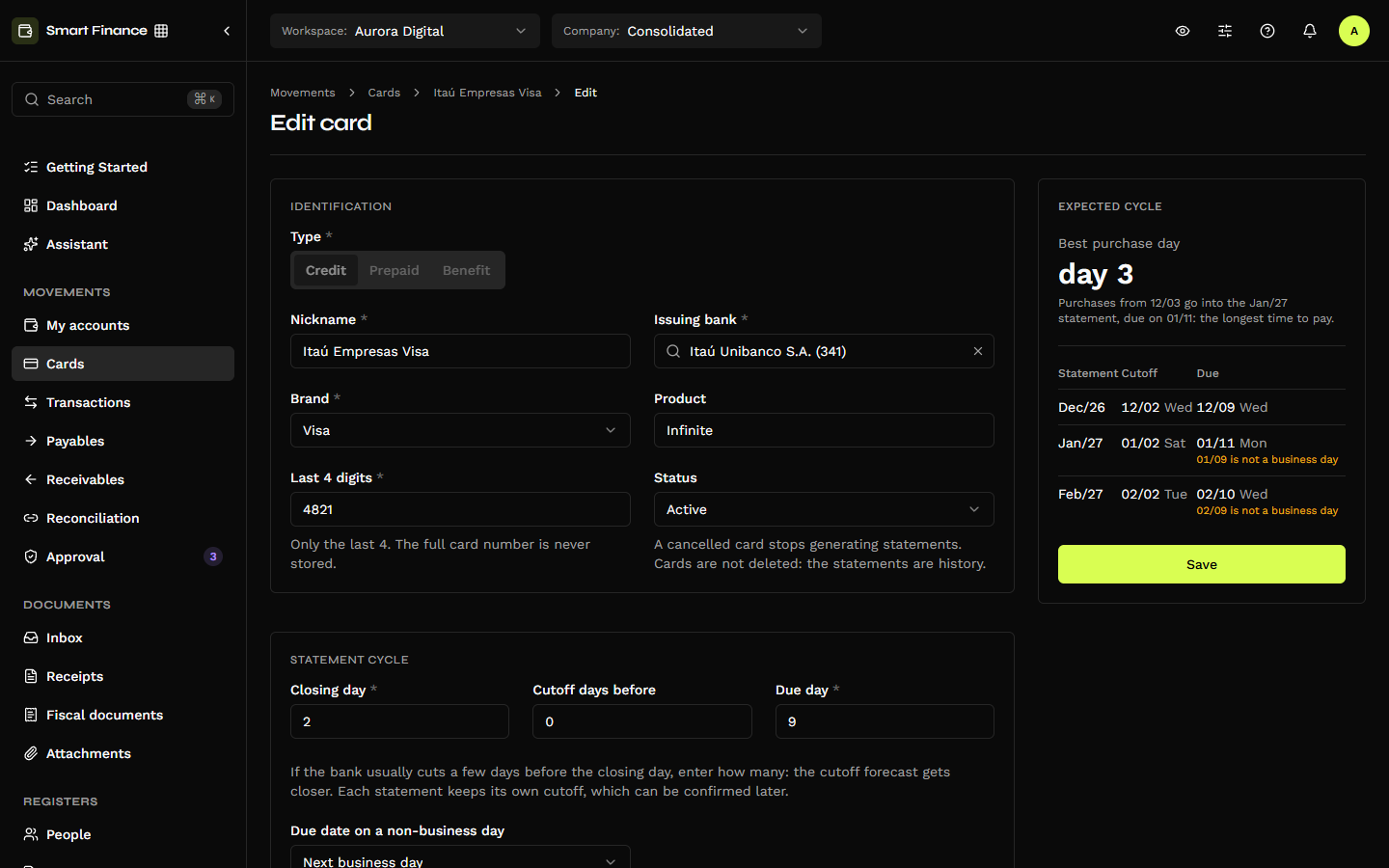
New card (/credit-cards/new) opens the form as a page. On the right, the Statement preview panel shows, as you type, the best purchase day and the next statements with their closing and due dates.
The (i) icon next to a field's name explains the field. Hover over it, or reach it with Tab, to read the explanation. In the tables below, the texts marked (i) are those.
New account or conversion
The first block, Card account, decides which account in My accounts holds the card's entries:
| Option | What it does |
|---|---|
| Create a new account | "We create a credit-type account for this card in My accounts, with its nickname and bank." A card has no branch or account number, so the account is created without them. |
| Convert a credit account | "A credit-type account you already have gets statements and stays in My accounts. The company is the account's, and the issuing bank comes filled in from it." Only Credit accounts that are not cards yet are offered. |
The notice on the card list, "… is a credit account that is not a card yet", goes straight to the conversion with the account already picked. A converted account cannot be converted again into another card.
A purchase entered in both places counts twice. "Transactions already in … stay there. To avoid counting a purchase twice, pick a start date after the last transaction made in that account." Converting neither moves nor deletes the account's history: it stays in the account as it was, and the statements start with the one that includes the Start date.
Identification
| Field | Notes |
|---|---|
| Type | Credit, Prepaid or Benefit. It does not change after registering. |
| Nickname | Required, up to 60 characters. The card's name across the product. |
| Issuing bank | Required, from the bank list. |
| Brand | Required: Visa, Mastercard, Elo, American Express, Hipercard or Other. |
| Product name | Optional ("E.g. Black, Infinite"). |
| Last 4 digits | Required. (i) "For security, we keep only the last 4 digits. The full card number is never saved." |
| Status | Active, Blocked or Cancelled. (i) "A cancelled card stops generating new statements. Cards are not deleted, because their statements stay as history." |
A full card number is refused in every text field. Nickname, product, description and notes reject a digit run that looks like a card number — so a number pasted by mistake is never stored. CVV and expiry date do not exist on the form.
Statement dates
| Field | Notes |
|---|---|
| Closing day | 1 to 31. In a shorter month, the last day. (i) "The day the bank closes the statement. Purchases up to that day go on that month's statement; from the next day on, on the following one." |
| Early closing (days) | 0 to 15. (i) "Some banks close the statement a few days before the closing day. If yours does, enter how many days. E.g. closing day 10 and 2 days early: purchases up to the 8th go on this statement. If unsure, leave 0." |
| Due day | 1 to 31. (i) "The day the statement is due. If it falls on a weekend or holiday, the Due date on a non-business day rule applies." |
| Due date on a non-business day | Next business day, previous business day, or keep the date. |
| Start date | (i) "Statements start with the one that includes this date. Earlier purchases are not added to the card." A past date creates the statements from it on. |
How the dates come out. A statement is named after the month of its due date. The closing falls in the same month when the closing day comes before the due day (closes on the 2nd, due on the 9th: both in December); when it comes after, it falls in the previous month (closes on the 25th, due on the 5th: closing in November, due in December). The closing is inclusive: a purchase made on the closing day itself still goes into the statement. With Early closing (days), each statement's closing date is the closing day minus those days.
Business days follow the banking calendar: Saturdays, Sundays, the national holidays and the movable ones around Easter — Carnival Monday and Tuesday, Good Friday and Corpus Christi. On the panel, an adjusted due date carries the warning "01/09 is not a business day".
The Statement preview panel
- Best purchase day — the day after the closing: "Purchases from 12/03 go into the Jan/27 statement, due on 01/11: the longest time to pay."
- The next three statements, with closing date, due date and the weekday of each.
- On registering, "First statement in the system: … (purchases from … to …)." and, at the foot, "On saving, we create the current statement and the next 12."
The panel runs the same rules as the server: the dates it shows are the dates the statements will have.
Changing the dates later
"Changing the closing or due day recalculates the upcoming statements whose closing date is not confirmed yet, and the entries move to the right statement." Open, closed and paid statements do not change, and neither do future ones whose closing date someone already confirmed. To fix the closing date of a single statement, use Change closing date on it — see Statement and closing.
Limit and payment
| Field | Notes |
|---|---|
| Limit | Credit cards only. With no limit, the tile shows no bar. |
| Limit alert | (i) "The limit bar turns yellow when usage goes past this percentage. E.g. 80%." |
| Account that pays the statement | (i) "The bank account, of the same company, the statement payment leaves from. Each statement's payable comes with it." On a prepaid card the field is called Account for top-ups. |
| Payment method | Direct debit, Boleto or Pix. (i) "How the statement is usually paid. It goes on each statement's payable." |
| Statement supplier | (i) "Who shows as the supplier on each statement's payable. Left blank, we use the issuing bank." |
| Default category · Default classification center | (i) "Comes filled in on each new card entry. You can change it on the entry." |
On prepaid and benefit cards the limit is not typed: "On prepaid and benefit cards, the limit is the loaded balance: each top-up raises it."
International purchases
| Field | Notes |
|---|---|
| IOF rate | (i) "Left blank, each purchase uses the official rate in force on its date. Fill it in only if your bank charges a different rate." |
| Bank spread | In percentage points (4 = 4%). (i) "The percentage the bank adds to the official exchange rate (Central Bank PTAX) on international purchases. We use it to estimate the rate until the statement arrives." |
See Entries and IOF.
After saving
Register card (or Convert into a card) creates the open statement and the next 12 and opens the card. From then on, every night, the system closes the statement whose closing date has passed and opens the next one — see Close, review and pay.
To edit, use the pencil next to the card's name or Edit card on the tile's menu. When editing, Type and company do not change, and the Start date only moves back.
Adding an earlier statement
To add the purchases of a statement from before the card was registered (the PDF of a statement already due, for instance), edit the card and move the Start date back to the start of that statement's period — at most 24 months back. (i) "Move the date back to add purchases from earlier statements: the statements from it on are created, and the ones past their closing close in the daily routine." The oldest one stays open to take the entries; the next night, the system closes the ones past their closing date, each with its payable on its own due date, and opens the current statement again. Without this, an entry dated before the first statement is refused: "The date is before the card's first statement in the system. To add it, move the card's start date back."