Close, review and pay
Close
The statement closes automatically. Every night the system closes the open statement whose closing date has passed and opens the next one. The open statement's line says when: "Closes automatically overnight on 12/03/2026 and creates a R$ 6.348,80 payable due 12/09."
Close statement now does it earlier: "Creates the … payable due … now. If you don't close it, it closes automatically overnight on …. Purchases for this statement entered after closing go to the next open statement."
The statement's payable
On a credit card, closing creates a payable:
| Field | Value |
|---|---|
| Description | "Fatura Itaú Empresas Visa — 11/2026" |
| Supplier | The card's Statement supplier, or the issuing bank |
| Amount | The statement total |
| Due date and competence | The statement's due date |
| Pay via | The Account that pays the statement, from the card's settings |
| Payment method | The card's |
| Category | None: each purchase is already in its own category |
It shows up on Payables with the Card statement source. With payment approval on, it enters the approval queue like any payable.
The amount of that payable is the statement's. It changes through the review (it becomes the bank's total) and through a partial payment — never by editing the payable, which refuses an amount change. It cannot be deleted while the statement exists either. Description, due date and the rest stay editable.
Prepaid and benefit cards close without a payable, and so does a statement whose total is zero or negative.
Review against the bank
With the bank statement at hand, Review against the bank opens "Review against the bank statement": the System total, the live Difference, the Bank statement total and the Minimum payment (optional).
| Result | What happens |
|---|---|
| It matches | "It matches: the statement becomes Reviewed and the payable changes to …." |
| It does not match | "It does not match: the figures are saved and the statement stays Closed, showing the difference, until what is missing is entered." |
To make it match: enter what was missing (a purchase that came late, interest and fees, a refund), confirm the recurring charges with the real amount, or adjust the rate of the international purchases. Then review again.
Pay
Pay statement — on a closed or reviewed statement, or through Pay on the list tile — opens the payment:
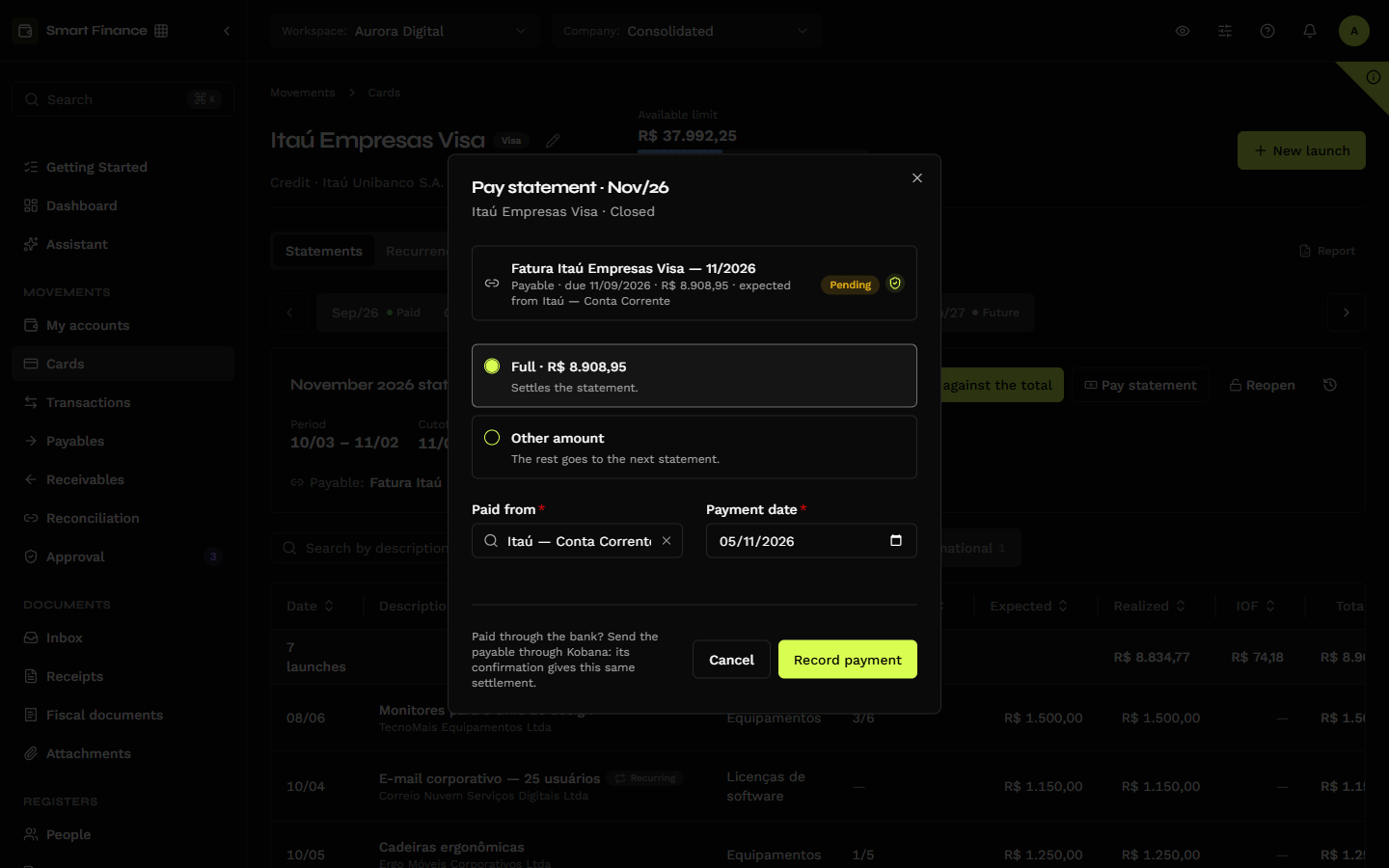
| Option | What it does |
|---|---|
| Full | "Settles the statement." |
| Minimum | Only when the minimum payment was entered in the review. "The rest goes to the next statement." |
| Other amount | Any amount up to the statement total. |
Paid from is the account that pays the statement (you can change it) and Payment date the day the money left. Record payment records a transfer from that account to the card account, settles the payable and turns the statement's entries Reconciled.
Paying through any door gives the same result. Settling the statement's payable on Payables, through the API, or through the bank's confirmation when the payment was sent through Kobana produces exactly the same outcome: the transfer, the statement paid and the entries reconciled. "Paying through the bank? Send the payable through Kobana: when the bank confirms, the payment is recorded here automatically."
Partial payment
Paying less than the total leaves the statement Partially paid, and the difference goes to the next statement as Previous balance — the "Saldo da fatura 11/2026" entry. The dialog warns: "The remaining … goes to the next statement as previous balance. When interest and late fees show up on the statement, enter them as Interest and fees." The system does not compute interest.
Undo the payment
Undo payment asks first: "Deletes the … payment (the transfer to the card's account) and the balance that went to the next statement. The statement goes back to Reviewed or Closed." The payable goes back to pending, with the statement total. If the statement that received the previous balance has already closed, the undo is refused: reopen it first.
Reopen
Reopen takes the statement back to Open — to enter a missing purchase, fix an amount or a date, or change the closing date. "The statement goes back to Open, and the history records who reopened it and when. The payable stays; the total is recalculated when it closes again."
On a paid statement: "The payment stays recorded, the balance that went to the next statement is removed and the entries go back to Realized. The total is recalculated when it closes again." When it closes again, the statement goes back to Paid if the payment covers the new total, or stays Partially paid with the difference on the next one.
There is only one open statement per card: the one that was open goes back to future while the reopened one has not closed. If the reopened statement's closing date has already passed, it closes again the following night — close it earlier with Close statement now once you are done.
Prepaid and benefit
Top up (on the list tile or in the card header) records a top-up: the amount, the date and the account it leaves from (Paid from, the card's account for top-ups). "It enters as a credit in the open statement (…). The balance becomes …." The top-up is a transfer from the bank account to the card account; deleting it on the statement deletes the transfer.
A prepaid card's statement has the same cycle and the same review, but closes without a payable: once reviewed, it ends as Reviewed.
In the cash flow
The card is not cash. In the cash flow:
- What already happened — the outflow is the statement payment, on the payment day, from the account that pays the statement. Purchases do not come in one by one.
- What lies ahead — the open and future statements come in through their expected total, on the due date, in the account that pays the statement. Once closed, the statement comes in through its payable (without counting twice).
- Prepaid — the cash outflow is the top-up; the statement never enters the projection.
Picking the card's account on the Account selector, the projection and cash-flow tabs show a notice instead of the chart — "Itaú Empresas Visa is a card: it is not part of the cash flow" — with a View shortcut to the account that pays the statement. Balances add up cash accounts only; cards come after, in grey.
The Dashboard (the month's performance, largest expenses) still sees each purchase on its date: it is the expense view, not the cash view.