Recurrences
Subscriptions and services charged every month on the card — software, hosting, e-mail — become recurrences. Each recurrence puts an expected charge on every open and future statement; when the bank statement arrives, you confirm the real amount.
Create
On the card's Recurrences tab, New recurrence — or New entry with the Recurring type. The fields:
| Field | Notes |
|---|---|
| First charge | When the subscription starts being charged. |
| Amount | The expected amount of each charge. On a subscription in a foreign currency, the amount in that currency. |
| Charge day | The day of the month the subscription is charged to the card (capped to the month's last day). |
| Frequency | Monthly, Quarterly or Yearly. |
| End date | (i) "Left blank, the charge has no end date. If you end it later, the expected charges from then on are cancelled." |
| Description · Supplier · Category · Classification center | Copied to each expected charge. |
"One expected charge on each statement, from Dec/26 on." A closed statement never gets a new expected charge.
An expected charge is not an expense yet. It counts in the statement's Expected total and in the limit used, but not in the card's account, on Transactions or on the Dashboard. It becomes an expense when it is confirmed.
On a subscription in a foreign currency, the expected charge is converted at the PTAX of the previous business day plus the card's Bank spread. If the Central Bank does not answer and there is no stored rate, the expected charges wait: "No USD rate right now: the expected charges come in when the Central Bank answers."
Confirm the real amount
On the statement, Confirm recurring charges (3) opens the list of that statement's expected charges: "Type the amount shown on the bank's statement. Enter confirms and moves to the next one. Left blank, it confirms the expected amount."
- A variation of more than 5% over the expected amount shows in amber.
- On an international subscription, enter the Real rate too.
- Not charged takes the charge out of the statement total: the bank did not charge it this month.
Confirming also works with the statement closed — that is how you review it against the bank statement. A reviewed or paid statement no longer takes confirmations: reopen it first.
Each charge also has actions on the statement row menu: Edit (to confirm a single one) and Mark as not charged.
The Recurrences tab
| Column | What it shows |
|---|---|
| Description | With the supplier and the category below |
| Amount | The expected amount, in the recurrence's currency |
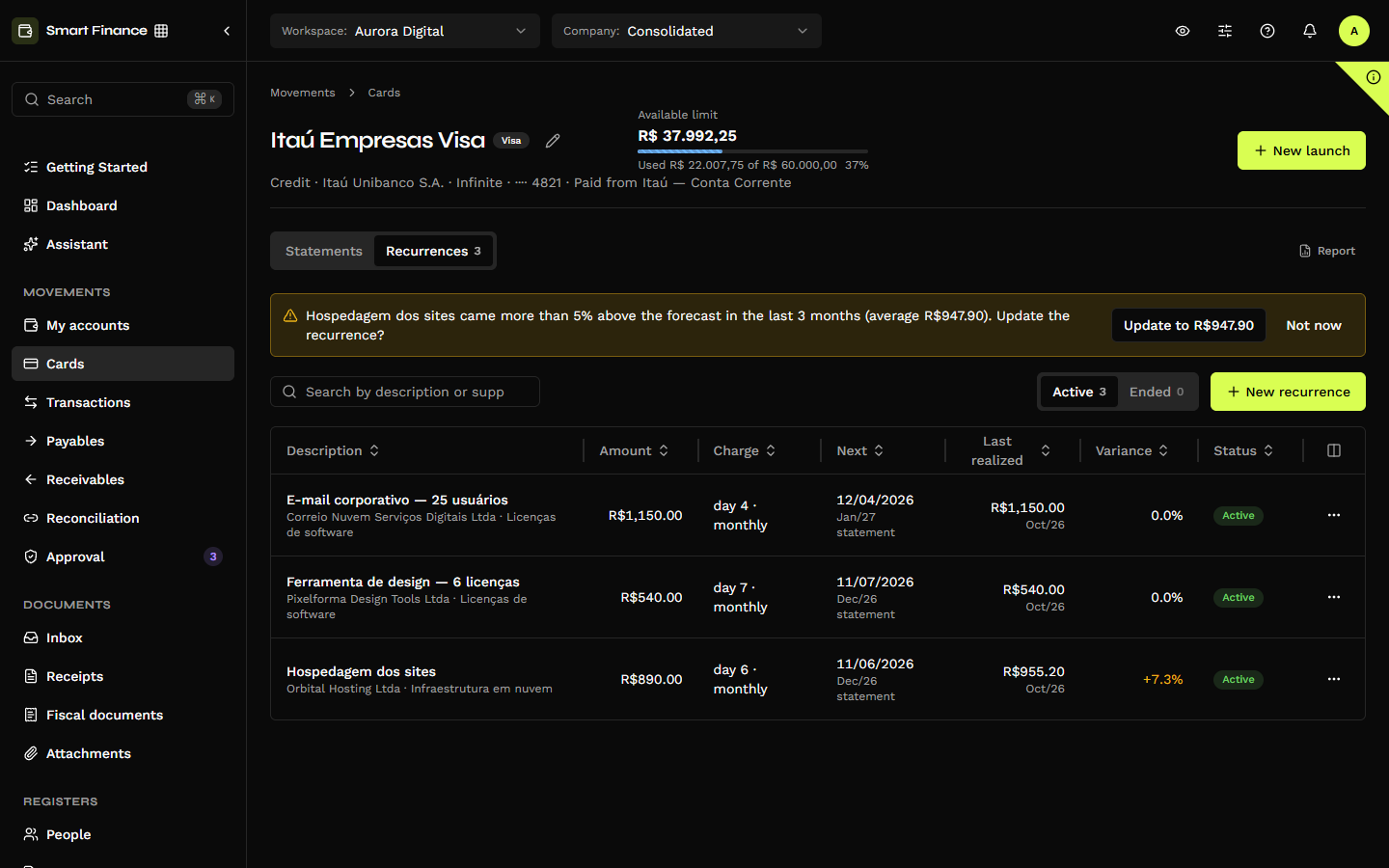
| Charge | "day 4 · monthly" |
| Next charge | The date of the next charge and the statement it falls on |
| Last real amount | The last confirmed amount and its month |
| Variance | Of the last real amount over the expected one |
| Status | Active or Ended |
The search, the Active and Ended tabs and the New recurrence button. The Recurrences tab at the top shows how many are active.
The suggestion to update the amount
When the last three confirmed charges all came more than 5% above (or below) the expected amount, a notice at the top of the tab suggests their average:
"Hospedagem dos sites came more than 5% above the forecast in the last 3 months (average R$ 947,90). Update the recurrence amount?"
Update to R$ 947,90 changes the amount of the recurrence and of the expected charges not edited yet. Not now hides the notice until the suggestion changes. A not charged month in between breaks the run, and there is no suggestion when the average is within 5% of the current amount — the case of a subscription stable in dollars while the exchange rate moves.
Edit, end, delete
| Action | What it does |
|---|---|
| Edit | "Expected charges not edited yet follow the recurrence. What was already confirmed does not change." |
| End | Asks for the end date. "Expected charges after this date are cancelled. What was already confirmed does not change." |
| Delete | "… and its expected charges leave the statements. It can only be deleted while no charge was confirmed; after that, end the recurrence." |
Editing a charge on the statement with the This and the next ones or All of them reach also updates the recurrence — see Entries and IOF.
In the report
The Forecast vs. actual report compares, month by month, what each recurrence expected and what was charged.