Sending payments to the bank
Smart Finance sends payables to the bank through the Banking Gateway. Sending is a manual action — done by a person, one bill at a time or in batch from the inbox — never by an automatic trigger, unless automatic dispatch after approval is on in the Approval Settings. The status tracking runs in the background.
Before any dispatch, the workspace's Security rules apply — limits, accounts, payees, operation types, channels and night hours. See Security blocks.
Prerequisites
- Banking Gateway connected and active, with the source account already synced.
- An official bill: it is only sendable after passing through payment approval — or if it was born official, like the occurrences of an approved recurrence and the bills imported from Fintera. A bill awaiting that approval or rejected is blocked. Don't confuse it with the bank's approval, which only exists after dispatch.
- Operation type set and the payment coordinates filled in — barcode, PIX key, bank details. See Operation and payment.
- "Pay from" set — that's the account the money leaves from.
- Allowed by Security: channel, operation type, account, payee, time of day and limits.
Dispatch flow
There is no "schedule" on the screen. Sending is always your click — nothing goes out on its own, on any date. What the system sends to the bank, along with the payment, is the date it should settle: the bill's due date. If the bill is already past due, it goes out today — the gateway doesn't pay with a backdated date.
Security blocks
The Security rules are checked on every dispatch — through the button, in batch or by automatic dispatch. Nothing is rescheduled: a held-back bill keeps its reason in sight and must be sent again once the rule allows it.
Reasons on the dispatch list
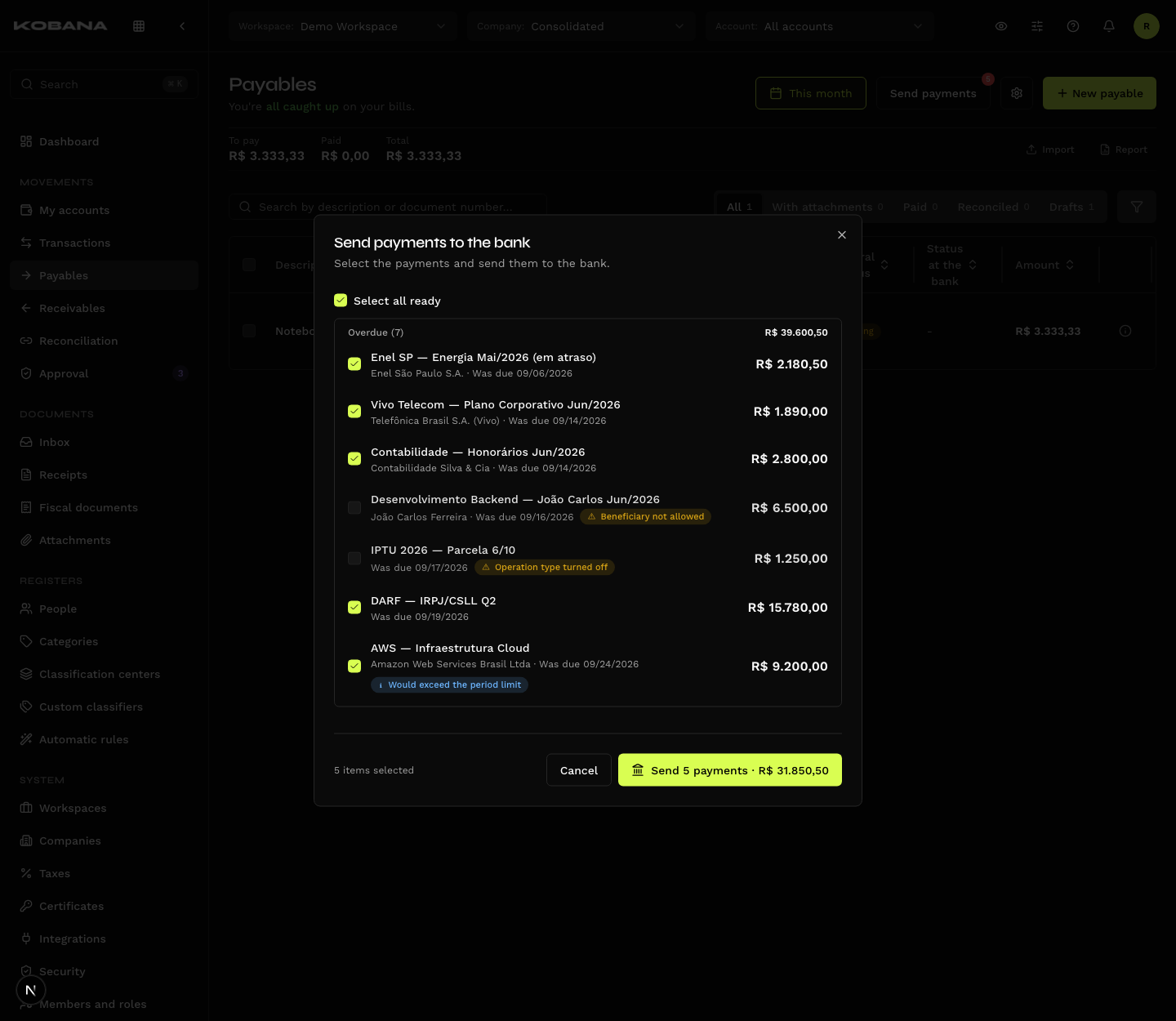
In the Send payments to the bank dialog, a bill held back by a rule that depends only on the bill itself shows disabled, with the reason — hover it to read the full message:
| Reason | Where it is solved |
|---|---|
| Channel not allowed to dispatch | Security → Channels (Pay) |
| Operation type turned off | Security → Operation types |
| Account blocked for this operation | Security → Accounts |
| Beneficiary not allowed | Security → Payees (transfers only) |
| Night dispatch blocked | Wait for the day period |
| Above the per-transaction limit | Security → Limits |
The limits that depend on what has already been sent show as a warning, and the row stays selectable:
- Would exceed the period limit
- Would exceed the account's daily limit
- Would exceed the beneficiary's daily limit
- Would exceed the beneficiary's monthly limit
The warning is a forecast: the final count happens at dispatch time. In a batch send, bills go in due-date order, and once a limit is reached the following ones that would exceed it are not sent. The result lists each bill that wasn't sent, with its reason.
If automatic dispatch after approval was refused by a rule, the row carries the Automatic dispatch blocked badge — the bill goes back to the list and waits for a manual send.
Forcing a resend does not escape the rules. Resending and resending a canceled payment go through the same checks, and the previous dispatch keeps counting toward the limit as long as there is no proof it doesn't exist at the bank.
Night sending off
With Allow sending to the bank at night off in Security, nothing goes to the bank between the start of the night and the start of the day. The list shows the notice "Bank dispatch blocked until 06:00" (with your workspace's hour).
Nothing is rescheduled for the morning. What was approved at night — even with automatic dispatch on — stays on the list and must be sent again during the day period.
Held at the bank
A payment created at the end of the day may have its batch's automatic approval fall in the night period. With night sending off, the batch is not approved and stays held at the bank:
- the payment card, on the bill, shows the "Held at the bank: night dispatch blocked" badge;
- the dispatch list gets a Held at the bank section;
- the Approve at the bank button (on the card and in the section) only works during the day period: it checks the rules again, approves the batch and resumes tracking.
"Refresh status" and the automatic tracking do not approve a held batch.
Gateway status
The status mirrors the payment's real state on the gateway:
| Status | What it means |
|---|---|
| Pending | Created on the gateway, not processed yet |
| Awaiting bank approval | In the institution's approval queue |
| Approved | Approved — but not settled yet |
| Scheduled · Awaiting scheduled date | Set for a future date |
| Awaiting funds | Not enough money in the account to settle |
| Overdue | Past the date and never settled |
| Finishing | In final processing |
| Confirmed | Settled — the money left |
| Reproved · Rejected | Refused by the institution |
| Failed | Processing error |
| Canceled | Dispatch canceled |
"Approved" is not the end. It's the state that misleads the most: the batch was approved, but the institution has not settled yet. What closes the cycle is Confirmed. The final states are Confirmed, Canceled, Rejected, Reproved and Failed.
Automatic settlement
Settlement happens when the gateway reaches Confirmed — not at Approved, which is still an intermediate step. Once there, the system marks the bill as paid and creates the outgoing transaction in the source account.
With no "Pay from" set, there is no automatic settlement. The system would have nowhere to post the outflow: the bill stays Confirmed and open. See Lifecycle.
The "Refresh status" button fetches the current state on demand, without waiting for the automatic tracking.
Receipt
Once it reaches Confirmed, the payment receipt is captured automatically: it is stored in the bill's Attachments and listed under Receipts. Whoever is set to receive them gets an email, and the addresses registered under "Receipt delivery" on the bill's form get the file attached; the bell notifies either way. See Who is emailed.
While it is being fetched the status reads Downloading — normal, and it takes a few moments.
Cancel dispatch
"Cancel dispatch" undoes the dispatch while the payment hasn't reached a final state. The bill stays on the gateway track, now carrying the "Canceled" badge, and "Mark as paid" comes back — so you can close the bill outside, if the payment ends up happening some other way.
That's why a bill already sent does not offer "Cancel": voiding it here would leave the payment alive on the gateway. The route is to cancel the dispatch first.
Editing after dispatch
Once dispatch starts, amount, payee, account and payment details are locked: "Bill already sent to the bank — amount, payee, account and payment details can no longer be changed." The bill must keep matching what was paid. Before dispatch, changing those fields on an approved bill sends it back to approval.