Companies
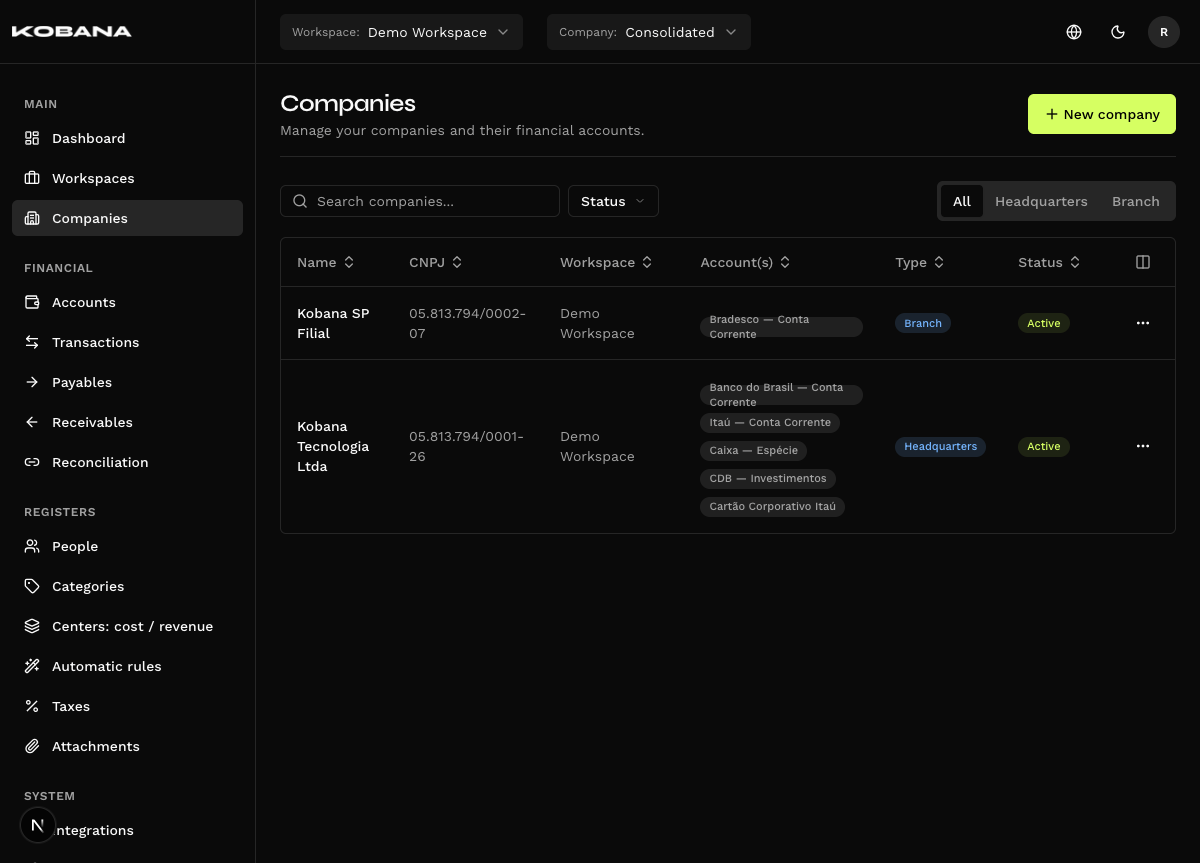
Companies (/companies) represent the legal entities (CNPJs) managed inside the workspace. Smart Finance is multi-company: a single workspace can run the financial back-office of several companies at once.
Creating a company
The form has two fields, and the second depends on the first:
| Field | Required | Description |
|---|---|---|
| CNPJ | Yes | The company's CNPJ. When you leave the field, the system queries Receita. |
| Name | Yes | Filled in by the lookup. It only accepts typing when the lookup doesn't answer. |
Active and Financial accounts appear only when editing — a new company is born active, and at creation time there are no accounts to link yet. The flow is: create the company, then create the accounts.
The CNPJ accepts letters
A CNPJ has 14 characters, not 14 digits. In Receita Federal's alphanumeric format, the first 12 characters (the root and the establishment number) accept letters and numbers; only the 2 check digits at the end are numeric-only. The field's mask handles this, and letters you type are uppercased automatically.
The CNPJ is validated in the field itself before any lookup: an invalid check digit never reaches Receita.
Automatic Receita lookup
When you leave the CNPJ field (not while you type), the system queries Receita Federal and uses the answer to fill in the rest:
- Legal name filled in and locked. The Name field starts out blocked, with the hint "Enter the CNPJ above" — it exists to receive the legal name, not for you to type in. When the lookup answers, the name arrives ready.
- Registration status warning. If the company isn't ATIVA at Receita, an alert shows the status found — "Receita registration status: SUSPENSA.", for instance. It's only a warning: it doesn't block the registration.
- A duplicate CNPJ blocks. If the CNPJ already belongs to another active company in this workspace, the warning "CNPJ already registered." appears and the Save button won't go through. This check is local: the CNPJ of an inactive company doesn't reserve the spot, and uniqueness holds per workspace, not globally.
If Receita can't find the CNPJ ("CNPJ not found at Receita — enter the name manually.") or the lookup fails ("Could not query Receita — enter the name manually."), the Name field unlocks and you type it in. A lookup that doesn't answer never blocks the registration.
Type (headquarters or branch) is not a field
You don't choose it. The type is derived from the CNPJ itself, from the four characters of the establishment number — the 0001 in 12.345.678/0001-95. 0001 means Headquarters; any other value means Branch.
The type shows as a badge in the listing and as a filter (All · Headquarters · Branch), never as an editable field. If you correct the CNPJ of a company that already exists, the type is recalculated along with it.
Financial accounts
Each company can have several financial accounts, linked in the Financial accounts section of the edit form (Add account links an account that already exists).
The company is optional on a financial account, not required. An account can exist with no company. Linking is what lets you filter the Dashboard and the reports by company — it's useful, but the system doesn't demand it.
Company filter
The company selector in the application header persists across screens and filters the data on display. It lists active companies only.
Deactivating
Deactivating does not take the company off the Companies screen. It stays in the listing, with the Inactive badge in the Status column.
What deactivating does is take the company out of the header selector and out of the forms — it stops being an option on new entries, and the history stays intact.
- To deactivate: open Edit on the company's row and turn off the Active switch.
- To reactivate: the same path, turning the switch back on.
- To see the inactive ones: they already show by default. The Status filter (Active / Inactive) is there to narrow down — pinning Active is what hides them.
Deleting
Deleting is permanent and cannot be undone. The dialog warns you: "Are you sure you want to delete this company? All associated financial accounts will be removed."
Financial activity blocks the delete. If the company has transactions, payables, receivables or registered people, the system refuses and tells you what it found: "Couldn't delete this company because it has 3 transactions, 1 payable linked to it. Delete those records first and try again."
These don't block — they are deleted along with the company:
- Financial accounts (that's what the dialog warns about)
- The company's categories and classification centers
In practice the blocker almost always wins: a financial account with activity implies transactions, and a transaction blocks.
If the company has history and you only want it out of circulation, deactivate it instead of deleting.
WhatsApp integration
Each company can have its own WhatsApp settings (via Evolution API) to display the profile photos of customers and suppliers. See WhatsApp.