Transactions
Transactions (/financial-transactions) are the movements of the financial accounts: money coming in and going out. They are the basis for reconciling payables and receivables.
In this section
CSV import
Import transactions in bulk from a spreadsheet — inside the financial account, with a Portuguese header.
The listing
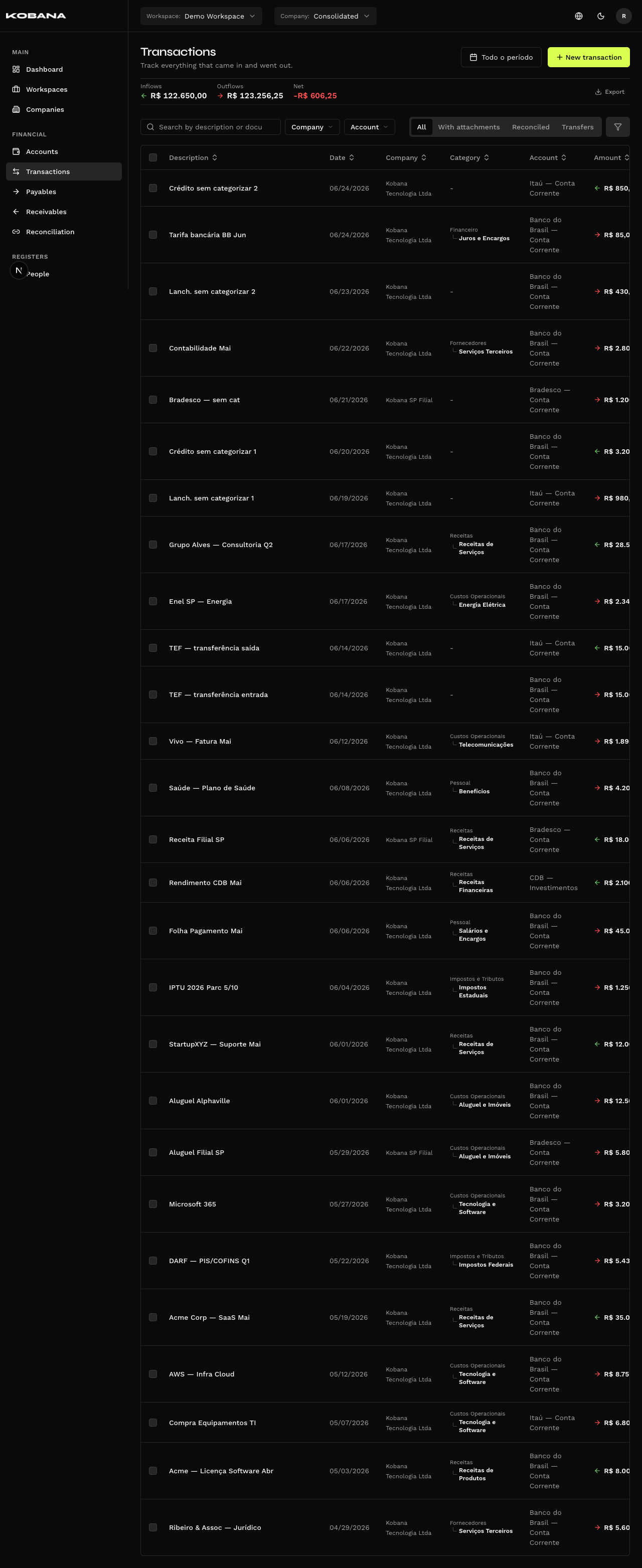
The header carries three totals — Inflows, Outflows and Net — with a green arrow for money in and a red one for money out.
The totals belong to the header, not the footer, and they have a scope of their own. They add up company + period and nothing else: searching by text or applying filters does not narrow them. Filtering by a category and watching the total stay put is not a defect — the strip answers "how much came in and went out over the period", not "how much the list is showing".
Filters
- Search — by description or document.
- Quick filters — All, With attachments, Reconciled, Transfers.
- Advanced filters — they take negative clauses, not just positive ones. They come in two kinds: pills that exist in both forms (Reconciled / Not reconciled, Transfers / Not transfers, With attachments / Without attachments), and the Uncategorized option inside the category picker — the same going for No customer / supplier and No classification center. Picking categories always includes: there is no way to exclude a specific category.
Next to the totals strip sits Export — which is not a filter but an action: it generates the transactions export file.
Columns
Description, Date, Category, Account and Amount — plus Company, only in the consolidated view. Payment method exists as a column you can turn on, and the last column is a summary card of the transaction (links, person, document, accrual, split, notes), visible on desktop.
Payment method is read-only. There is no such field on the form: the column only shows what came in through CSV or API. Create a transaction from the screen and it stays empty.
The badges on the Description column
There is no "Origin" field. Provenance is derived and shows up as icons next to the description:
| Badge | Meaning |
|---|---|
| Reconciled | Linked to a bill |
| Generated by … settlement | Created by the settlement of a bill |
| Transfer | One leg of a transfer |
| Provisional | Not yet effective |
| Paperclip | Has attachments |
Actions
Per row: Classify, Reconcile, Edit and Delete. In bulk: Reconcile selected, Classify selected and Delete.
Reconcile and Classify in bulk require a single company. Categories and bills are per company, so a selection mixing companies has no way to open the dialog — in the consolidated view the system warns you and cancels instead of picking a company on its own. Classify also asks that the whole selection be of the same type: inflows and outflows together are refused too, because the categories of one don't serve the other. Delete has none of those locks — it removes the selection as it stands.
Fields
| Field | Notes |
|---|---|
| Amount (R$) | Required |
| Date | Required |
| Financial account | Required — where the movement happened |
| Description | Required |
| Accrual month | Month picker |
| Entry type | Credit or debit |
| Category · Classification center | Classification, with the Split shortcut |
| Customer / Supplier | Associated person |
| Document number · Doc. date | The external document |
| Provisional | Marks the transaction as a forecast |
| Notes | Free text |
| Attachments | Files tied to the transaction |
Provisional
The "Provisional" pill marks the transaction as a forecast, not yet effective. It shows on the listing with a badge, but does not enter the account balance nor the realized figures on the dashboard — it counts towards the cash flow projection, not the realized side.
Automatic creation
Some transactions you never type — the system creates them:
- Settling a payable → an outflow in the chosen account.
- Settling a receivable → an inflow in the chosen account.
- A transfer → an outflow at the source and an inflow at the destination.
- An imported bank statement, when you confirm the import.
- A Banking Gateway sync.
Reconciliation
A transaction can be linked to payables and receivables. The link shows on the transaction detail and on the Reconciliation screen, which is where what came from the statement gets matched in bulk.