People
People (/people) are the customers, suppliers and contacts registered in the workspace. A single record can carry more than one role — customer, supplier, both, or neither — without becoming a duplicate.
The listing
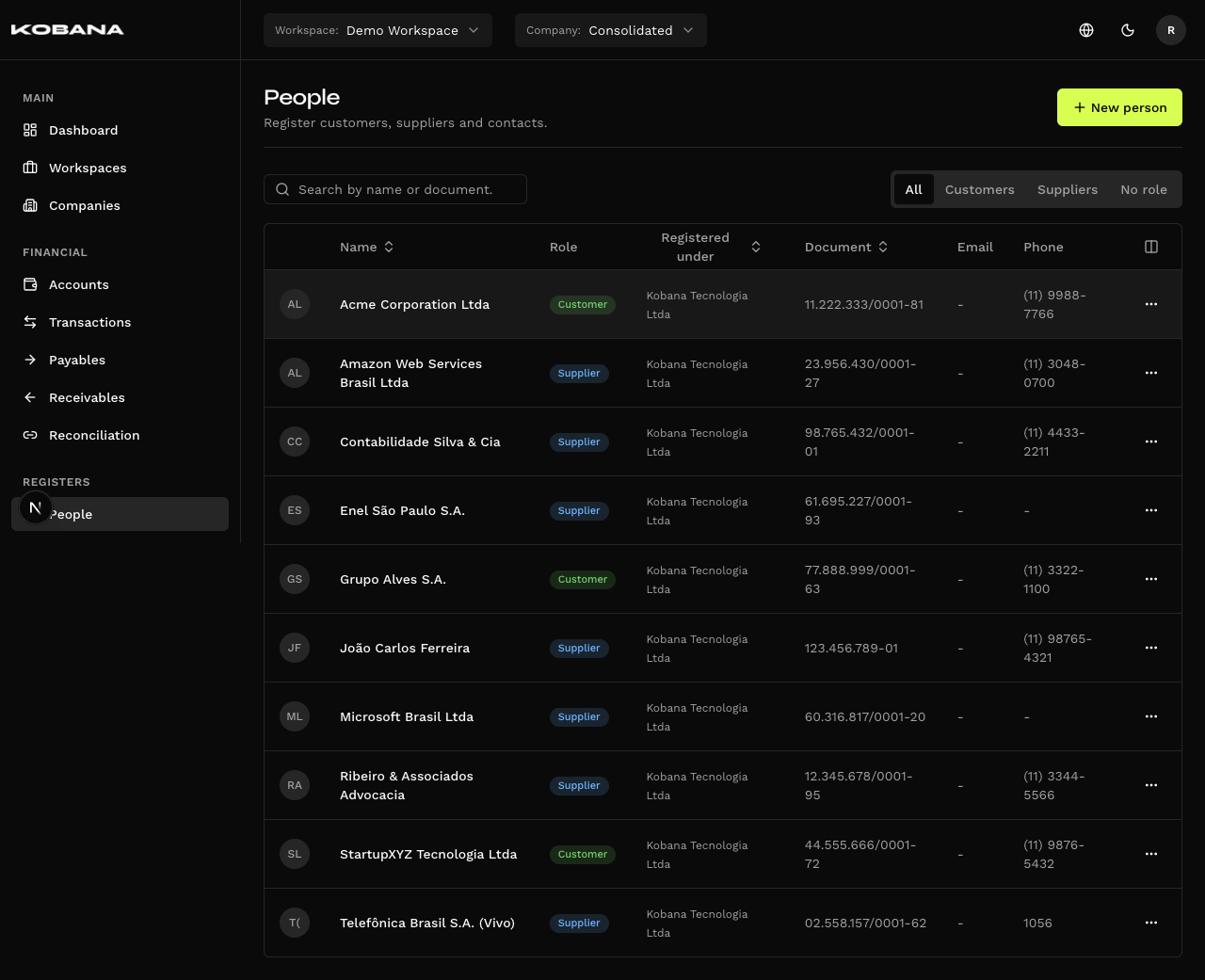
Columns: photo, Name, Role, Document, Email and Phone — plus Registered under, which only shows in the consolidated view. Each role becomes a badge — Customer, Supplier, Account manager, Team — or the text No role shows.
Above the table sit the search (by name or document) and the Role filter: All, Customers, Suppliers, Managers, Team and No role. Each row has two actions — Edit and Delete. The create button is "New person".
The form
Four tabs: Identification, Contact, Address and Banking.
Identification
| Field | Notes |
|---|---|
| Name | Required |
| Nickname | Optional |
| Legal name | "For legal entities — official legal name" |
| Register under | Required — the company the person is registered under |
| Role | The Customer, Supplier, Account manager and Team checkboxes. Leaving all unchecked is valid |
| Kind | Detect automatically (default), Natural person or Legal entity |
| CPF / CNPJ | The label and the mask follow the Kind — CPF by default, CNPJ for a legal entity |
| Date of birth | Optional |
You don't have to pick a Kind. On the default, the system infers it from the document you type.
Contact
Emails and Phones, both as lists — add as many as you need.
Only the email has a label. Each email takes a free-form label (finance, sales…). Phones have no such field. And "primary email" is not a concept here — no email is singled out as the main one.
Address and Banking
Two tabs of their own. Banking covers bank, branch and account (with check digits), PIX key and key type.
Roles
| Combination | Typical use |
|---|---|
| Customer | Someone who pays the company |
| Supplier | Someone the company pays |
| Customer + Supplier | A partner that both buys and sells |
| Account manager | A bank manager serving one of the company's accounts — see Managers |
| Team | The company's own people: partners, finance staff — see Accesses |
| None | A contact with no active financial relationship |
The role decides where the person shows up: the Customer field on receivables searches customers only; the Supplier field on payables, suppliers only.
For someone who is or was a manager, the person detail shows Accounts managed, with the period of each; for someone with account accesses, Account accesses, with the level of each.
Search and automatic creation
As you type a name in the payable or receivable form, the system searches the existing records and, finding none, offers to register the person by that name — they are created along with the bill on save. The CSV import does the same.
Profile photo
The system looks for the photo in two sources, in this order:
- Gravatar — by the registered email. This is the primary source.
- WhatsApp — by the phone number, and only if the integration is configured for the company. This is the fallback, used when Gravatar returns nothing.
No photo appears on its own. The lookup doesn't run in the background, nor when you save the person: it's a manual tool, under Maintenance → Fetch photos. Each run covers only people who still have no photo, capped at 100 at a time, and waits 30 days before retrying anyone who failed. The photo it finds is stored on the record — it isn't fetched again on every visit.
The photo shows in the listing and at the top of the person's detail page.
Transfers and Security
The Payees tab in Security decides which payees transfers (Pix and TED) can be sent to at the bank. The rule looks at the CPF/CNPJ, not the record:
- One rule per document. The same person registered in several companies shows up only once in Security, and allowing, blocking or limiting applies to every record with that CPF/CNPJ — with the daily and monthly limits added up across companies.
- Registering is not blocked. In Block everyone and allow some mode, a new person can be registered and used on bills as usual; only sending transfers to them is held back ("Beneficiary not allowed") until someone requests the document be allowed and Kobana approves. In Allow everyone and block some mode, they start allowed.
- Bank slips, taxes and utilities don't go through this rule — the money goes wherever the barcode says, and the control lives in Operation types.
- Deleting or merging records doesn't change the rule. A blocked document stays blocked even with no active record (it shows in Security as "No active record"), and an allowed one stays allowed.
Deleting
There is a single blocker: an automatic rule pointing at the person. While one exists, the delete fails — the rule would go on classifying against someone invisible, and there is nobody to repoint it to. Edit or remove the rule first.
Payables, receivables and transactions don't block. The dialog shows you what is linked, but lets you delete anyway.
Deleting cannot be undone — and that's deliberate. The person leaves the screens, but their financial history stays intact, still pointing at the deleted record. There is no "restore": once deleted, the CPF/CNPJ is released, and nothing stops another record from taking it. That's why coming back isn't offered — it could collide with whoever took the spot.